


Every week someone asks us a version of the same question: “We want to use AI. Where do we actually start?” Not the strategy deck — the keyboard. Which model, which library, what does a call cost, and how do we get it to answer from our documents instead of the internet?
This post is that starting point. It is a working walkthrough of LLM API integration — setting up an environment, calling Claude, OpenAI and an open-source model from the same Python code, understanding what each configuration setting actually does, calculating what you will be billed, and building a retrieval pipeline over your own policies and reports so the model answers with citations instead of confidence.
No hand-waving. Every code block below runs. Every price is a real list rate as of August 2026. And every limitation we have run into ourselves is written down, because those are the parts that decide whether your pilot becomes a product or a demo nobody trusts.
1. First, understand what one API call really is
The single most useful mental model: an LLM API is stateless. It remembers nothing. Every call you make ships the entire conversation, the entire system prompt, and every document excerpt you want the model to consider — from scratch, every time. The model reads all of it, generates a response one token at a time, and forgets everything.
That one fact explains most of what follows: why your costs grow as a chat gets longer, why “teaching” the model your policies is really about retrieval, and why the input side of your bill is usually the side that surprises you.
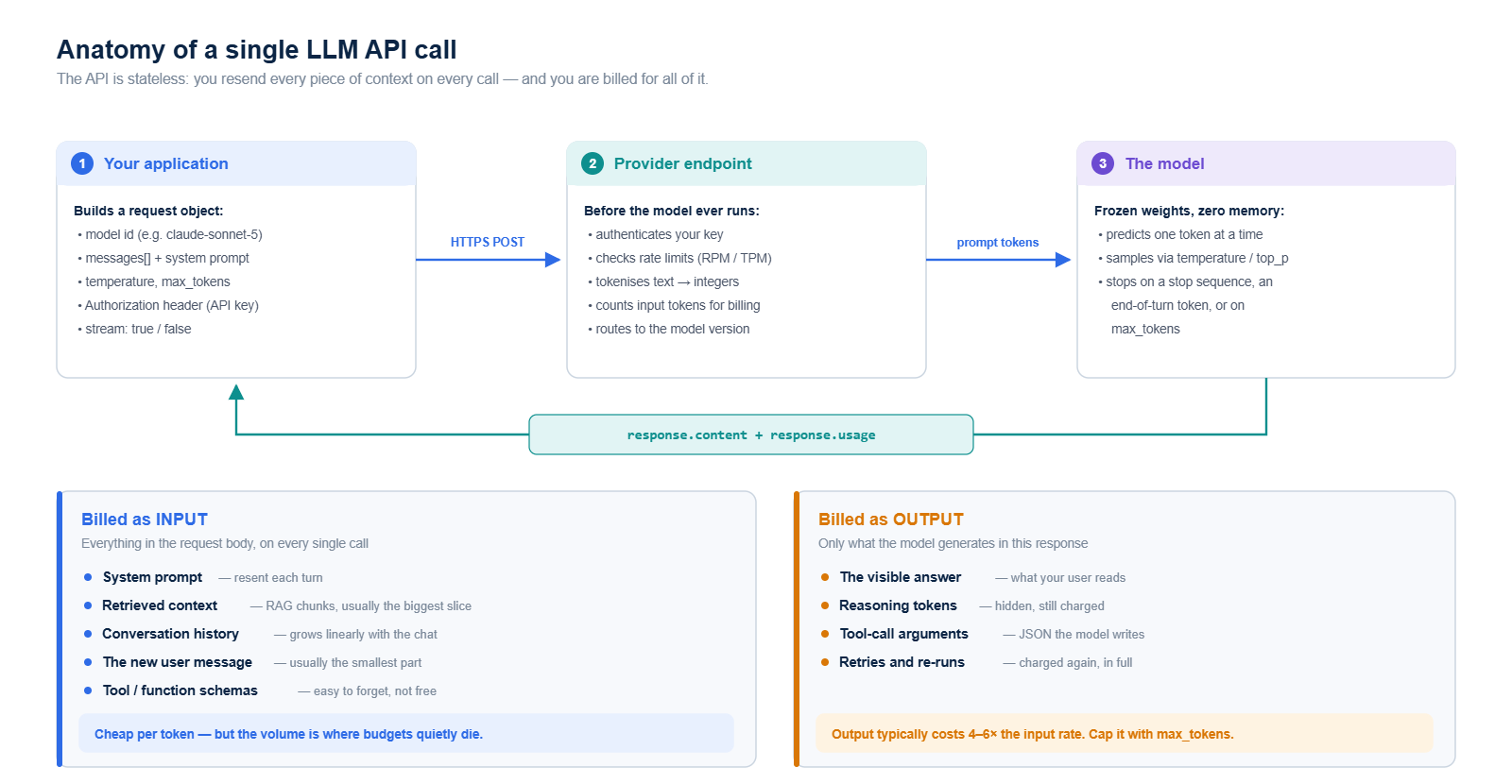
A token is roughly four characters of English — about three-quarters of a word. “Regulatory compliance management” is about five tokens. A 40-page policy document is roughly 20,000. You are billed per million tokens, separately for what you send and what you receive.
2. Hosted API or open weights?
Before writing code, pick your lane. Both are valid; they fail in different ways.
| Hosted API (Claude, OpenAI) | Open weights (Llama, Gemma, DeepSeek, Qwen) | |
|---|---|---|
| Time to first result | Minutes | Hours to days |
| Cost shape | Per token; scales with usage | Per GPU-hour; fixed whether you use it or not |
| Data location | Provider infrastructure; check residency and retention terms | Entirely yours — can run fully air-gapped |
| Capability ceiling | Highest available; upgrades arrive free | Strong and closing, but you own the upgrade work |
| Best fit | Reasoning-heavy work, low volume, fast iteration | High volume, narrow tasks, strict data-residency rules |
Our practical advice: prototype on a hosted API, then measure before you migrate. Teams that start by standing up GPU infrastructure usually spend three weeks on plumbing before learning whether the use case was worth building. And the honest answer is often a hybrid — a small local model for classification and redaction, a frontier hosted model for the reasoning that actually matters.
3. Setting up the environment
Nothing exotic. Python 3.10+, a virtual environment, and three or four packages.
# A clean, isolated environment
python3 -m venv .venv
source .venv/bin/activate          # Windows: .venv\Scripts\activate

# Model SDKs
pip install anthropic openai

# Local / open-source inference and the RAG stack
pip install sentence-transformers faiss-cpu pypdf python-dotenv
Keys go in a .env file that is in .gitignore before you write the first key into it. Never in the code, never in a notebook you will email, never in a screenshot.
# .env
ANTHROPIC_API_KEY=sk-ant-...
OPENAI_API_KEY=sk-proj-...
import os
from dotenv import load_dotenv
load_dotenv() # reads .env into os.environThree habits worth building on day one, because retrofitting them is miserable: use a separate key per environment so you can revoke dev without touching production; set a hard spend limit in the provider console rather than trusting yourself; and log every request and response with a timestamp, model ID and token count. That log is your only evidence when someone asks why the system said what it said.
4. Your first call — Claude
from anthropic import Anthropic

client = Anthropic(api_key=os.environ["ANTHROPIC_API_KEY"])

response = client.messages.create(
    model="claude-sonnet-5",
    max_tokens=600,
    temperature=0,
    system="You are a GRC analyst. Be precise and cite clause numbers.",
    messages=[
        {"role": "user", "content": "In two sentences, what is a risk control matrix?"}
    ],
)

print(response.content[0].text)
print("in:", response.usage.input_tokens,
      "out:", response.usage.output_tokens)
Three details that matter more than they look. The system parameter is separate from messages — that is where standing rules live. max_tokens is required, which is a deliberate design choice: you cannot accidentally ask for an unbounded response. And response.usage gives you exact billed token counts on every call — log them from the very first request and you will never have to guess at your cost model.
5. The same call — OpenAI
from openai import OpenAI

client = OpenAI(api_key=os.environ["OPENAI_API_KEY"])

response = client.responses.create(
    model="gpt-5.6-terra",
    instructions="You are a GRC analyst. Be precise and cite clause numbers.",
    input="In two sentences, what is a risk control matrix?",
    max_output_tokens=600,
)

print(response.output_text)
print("in:", response.usage.input_tokens,
      "out:", response.usage.output_tokens)
Same shape, different vocabulary: instructions instead of system, max_output_tokens instead of max_tokens, output_text instead of digging into a content list. The older chat.completions interface still works and is the one most tutorials show, but the Responses API is where the newer capabilities live.
One caveat that trips people up: on reasoning-oriented models, temperature is often ignored or rejected outright. If a sampling parameter appears to do nothing, check the model reference before assuming your code is broken.
6. The same call — an open-source model on your own machine
The friendliest on-ramp is Ollama, which downloads open-weight models and serves them behind an OpenAI-compatible endpoint. That last part is the trick: you can point the OpenAI SDK at localhost and your code barely changes.
# One-time setup
curl -fsSL https://ollama.com/install.sh | sh
ollama pull llama3.1:8b        # ~4.7 GB, runs on a 16 GB laptop
ollama serve                   # listens on http://localhost:11434
from openai import OpenAI
local = OpenAI(base_url="http://localhost:11434/v1", api_key="ollama")
response = local.chat.completions.create(
model="llama3.1:8b",
temperature=0,
max_tokens=600,
messages=[
{"role": "system", "content": "You are a GRC analyst."},
{"role": "user", "content": "In two sentences, what is a risk control matrix?"},
],
)
print(response.choices[0].message.content)No API key, no per-token charge, no data leaving the machine. An 8B model on a laptop is genuinely useful for classification, extraction, redaction and routing — and genuinely weaker at multi-step reasoning than a frontier model. Know which job you are giving it.
When you outgrow a laptop, vLLM is the standard production server (continuous batching, far higher throughput, also OpenAI-compatible), and Hugging Face Transformers is what you reach for when you need direct control of the model object rather than an HTTP endpoint.
7. One wrapper, three providers
Write this on day one. It costs twenty lines and it means switching providers — for cost, for an outage, for a data-residency requirement — is a one-line change instead of a refactor.
from anthropic import Anthropic
from openai import OpenAI

_claude = Anthropic(api_key=os.environ["ANTHROPIC_API_KEY"])
_openai = OpenAI(api_key=os.environ["OPENAI_API_KEY"])
_local  = OpenAI(base_url="http://localhost:11434/v1", api_key="ollama")

def ask(prompt, system="", provider="claude", temperature=0, max_tokens=800):
    """Returns (text, input_tokens, output_tokens) for any provider."""
    if provider == "claude":
        r = _claude.messages.create(
            model="claude-sonnet-5", system=system, temperature=temperature,
            max_tokens=max_tokens,
            messages=[{"role": "user", "content": prompt}])
        return r.content[0].text, r.usage.input_tokens, r.usage.output_tokens

    if provider == "openai":
        r = _openai.responses.create(
            model="gpt-5.6-terra", instructions=system, input=prompt,
            max_output_tokens=max_tokens)
        return r.output_text, r.usage.input_tokens, r.usage.output_tokens

    r = _local.chat.completions.create(
        model="llama3.1:8b", temperature=temperature, max_tokens=max_tokens,
        messages=[{"role": "system", "content": system},
                  {"role": "user", "content": prompt}])
    u = r.usage
    return r.choices[0].message.content, u.prompt_tokens, u.completion_tokens
Now the same evaluation set can be run against all three and compared on accuracy, latency and cost — which is the only honest way to choose a model.
8. The configuration settings that actually change your output
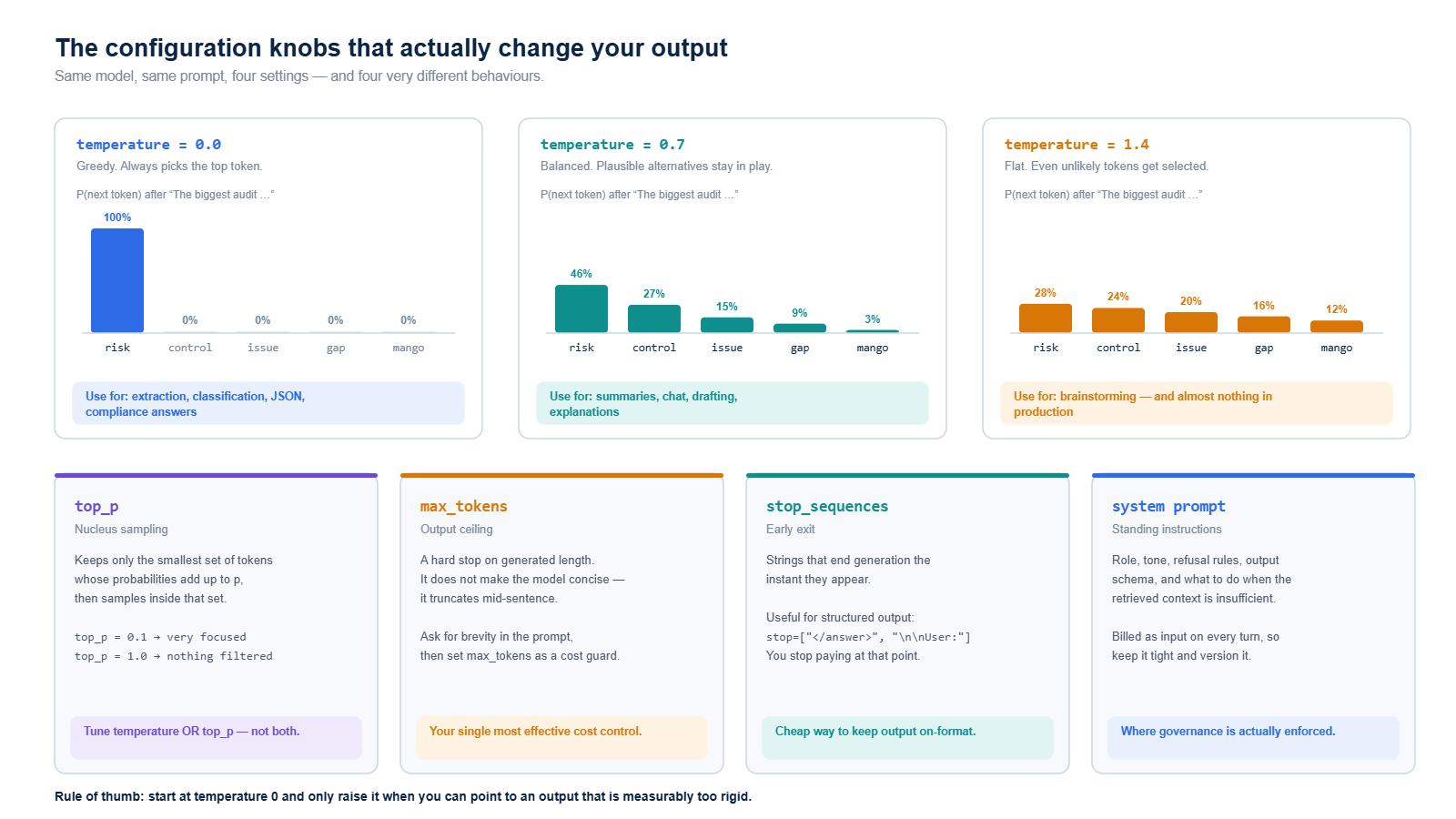
temperature controls how sharply the model favours its top guess. At 0 it always takes the most likely next token, so the same prompt gives you the same answer. Raise it and lower-probability tokens start getting picked. For anything a regulator, an auditor or a customer will read, stay at 0 — reproducibility is a feature. For brainstorming, 0.7 to 1.0. Above 1.2 you are mostly generating noise.
top_p (nucleus sampling) narrows the candidate pool to the smallest set of tokens whose probabilities sum to p, then samples within it. It achieves something similar to temperature by a different route. Tune one or the other, never both at once — the interaction is genuinely hard to reason about.
max_tokens is a hard ceiling on the response, not an instruction to be brief. Set it to 100 and ask for an essay and you get 100 tokens of essay, cut mid-word. Ask for brevity in the prompt, then use max_tokens as a cost guard-rail rather than a style control.
stop_sequences end generation the instant a given string appears. Invaluable for structured output — and because you stop being billed at that point, it is a small, free cost optimisation.
The system prompt is where your governance actually lives: role, tone, refusal rules, output schema, and above all what to do when the retrieved context does not contain the answer. Version it in Git like code, because that is what it is.
Two more worth knowing. Streaming (stream=True) does not change cost or total time, but it drops perceived latency dramatically because the user sees the first words in under a second instead of staring at a spinner for eight. And structured output — tool/function calling, or JSON schema enforcement — is a far more reliable way to get parseable JSON than asking politely in the prompt and hoping.
9. The limitations you have to design around
These are not bugs to be fixed later. They are properties of the technology, and a system that respects them is the difference between a pilot and production.
| Limitation | What it means in practice | How you handle it |
|---|---|---|
| Context window | Frontier models now take ~1M tokens, but recall of material buried in the middle of a very long prompt is measurably worse than at the edges. | Retrieve a few precise passages instead of pasting everything. Put the most important content first or last. |
| Knowledge cutoff | The model knows nothing about your company, and nothing about the world after its training date. | Retrieval for private knowledge, web search tools for current events. |
| Confident wrongness | A fabricated clause number reads exactly like a real one. Fluency is not accuracy. | Force citations to retrieved text, verify them programmatically, and make “I don’t know” an explicitly allowed answer. |
| Not fully deterministic | Even at temperature 0, identical prompts can differ slightly across runs due to batching and floating-point non-associativity. | Never assert exact string equality in tests. Assert on extracted fields and semantic similarity. |
| No memory | Turn 30 of a conversation costs far more than turn 1, because you are resending the whole history. | Window the history, or summarise older turns into a short running brief. |
| Rate limits | Requests and tokens per minute are both capped. You will meet HTTP 429 in your first load test. | Exponential backoff with jitter, a request queue, and the Batch API for anything not user-facing. |
| Latency | Seconds, not milliseconds — and it scales with output length, not input length. | Stream responses, cache repeated queries, run non-urgent work asynchronously. |
| Tokeniser blindness | The model sees tokens, not characters, so character counting and exact arithmetic are shaky. | Give it a calculator or a code tool. Do not ask it to do your sums. |
| Version drift | A model alias that silently points to a newer version can change behaviour under you. | Pin dated model IDs in production. Re-run your evaluation set before every upgrade. |
10. What it actually costs
List prices, per million tokens, as of August 2026. Note the ratio in every row: output costs four to six times input.
| Model | Input / MTok | Output / MTok | Context |
|---|---|---|---|
| Claude Opus 5 | $5.00 | $25.00 | 1M |
| Claude Sonnet 5 | $2.00 | $10.00 | 1M |
| Claude Haiku 4.5 | $1.00 | $5.00 | 200K |
| GPT-5.6 Sol | $2.50 | $15.00 | ~1M |
| GPT-5.6 Terra | $1.00 | $6.00 | ~1M |
| GPT-5.6 Luna | $0.10 | $0.60 | ~1M |
| Embeddings (text-embedding-3-small) | ~$0.02 | — | — |
| Open-weight model, self-hosted | $0 | $0 | You pay per GPU-hour instead |
Notice how cheap embeddings are. Indexing ten thousand pages of policy documents is a rounding error — which is exactly why retrieval is the right first move for most organisations.
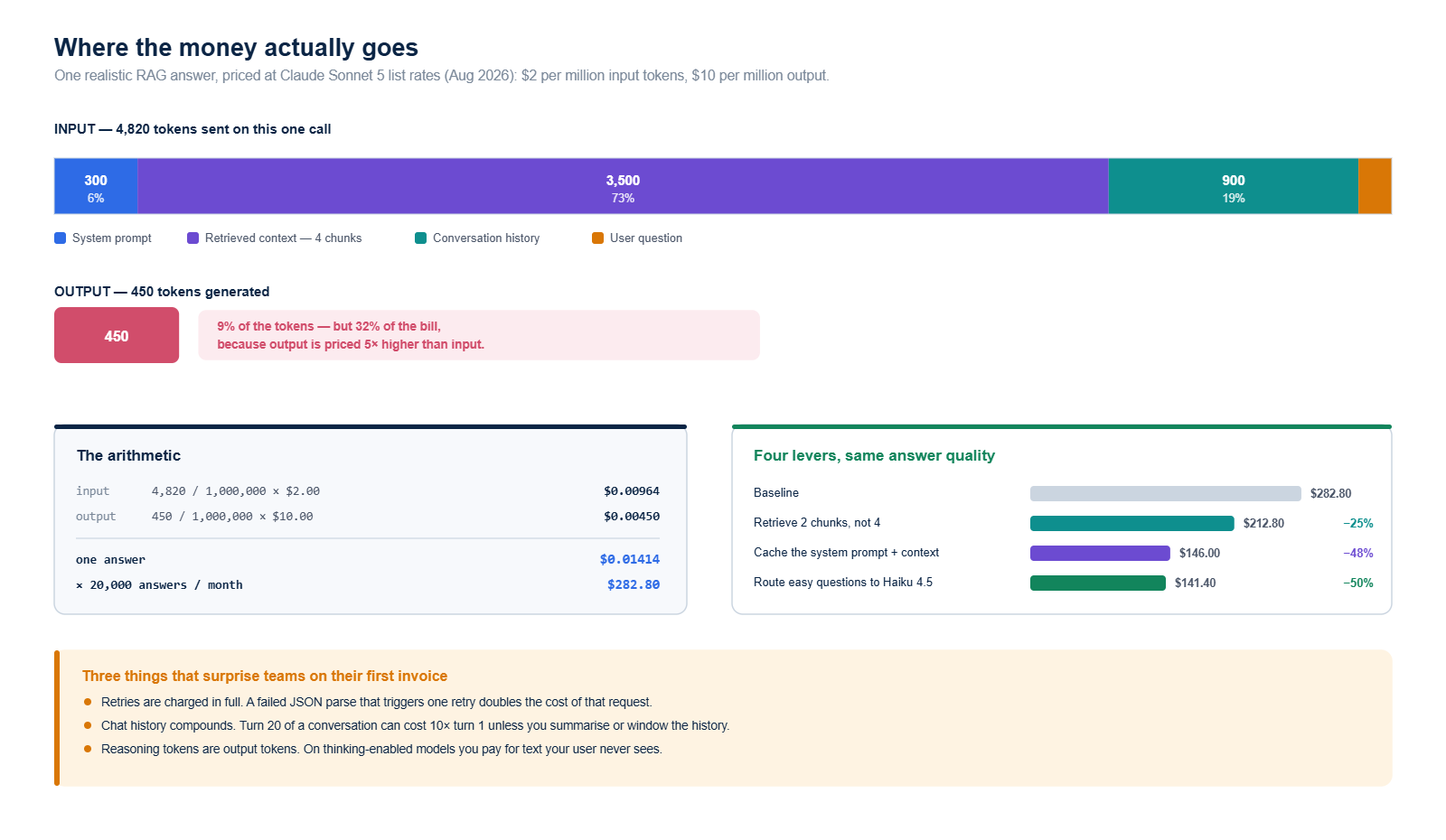
Work through the arithmetic once and it stops being mysterious. A single retrieval-augmented answer with a 300-token system prompt, four retrieved chunks (3,500 tokens), 900 tokens of chat history and a 120-token question sends 4,820 input tokens and generates about 450. On Claude Sonnet 5 that is 4,820 / 1,000,000 × $2.00 = $0.00964 in and 450 / 1,000,000 × $10.00 = $0.0045 out — about 1.4 cents per answer, or $283 a month at 20,000 answers.
Four levers move that number a long way:
- Prompt caching. Providers let you mark a stable prefix — system prompt, few-shot examples, reference documents — as cacheable. Cache reads are priced at roughly a tenth of normal input. In the example above, caching the system prompt and retrieved context cuts the bill by about 48%.
- Batch processing. For anything that does not need an answer in the next second — nightly summarisation, bulk classification, back-testing — the Batch API is 50% off both directions.
- Model routing. Send the easy 80% of queries to a small model and escalate only what needs a frontier model. This is usually the single biggest saving available and it costs you almost nothing in quality if you route on measured difficulty rather than guesswork.
- Retrieve less, better. Cutting from four weak chunks to two strong ones saves 25% and improves the answer. Padding a prompt with marginal matches actively degrades output.
And three things that catch teams out on their first invoice: retries are billed in full, so a failed JSON parse that triggers a retry doubles that request’s cost; chat history compounds, so turn 20 can cost ten times turn 1; and on thinking-enabled models, reasoning tokens are output tokens — you pay for text the user never sees.
11. Getting the model to answer from your documents
Here is the question everyone eventually arrives at: how do we make it know our policies? There are three answers, and picking the wrong one wastes months.
Prompt stuffing — paste the document into the prompt. Fine for one document, breaks at ten thousand.
Fine-tuning — adjust the model’s weights on your examples. It teaches form: house style, a specific output schema, a domain vocabulary. It is a poor and expensive way to teach facts, because every document update means retraining, and the model still cannot tell you which source a claim came from.
Retrieval-Augmented Generation (RAG) — find the three most relevant passages at question time and put them in the prompt. This is the right default for almost every enterprise knowledge problem: updates are instant, every answer is citable, access control is enforceable, and removing a document actually removes it from the answers.
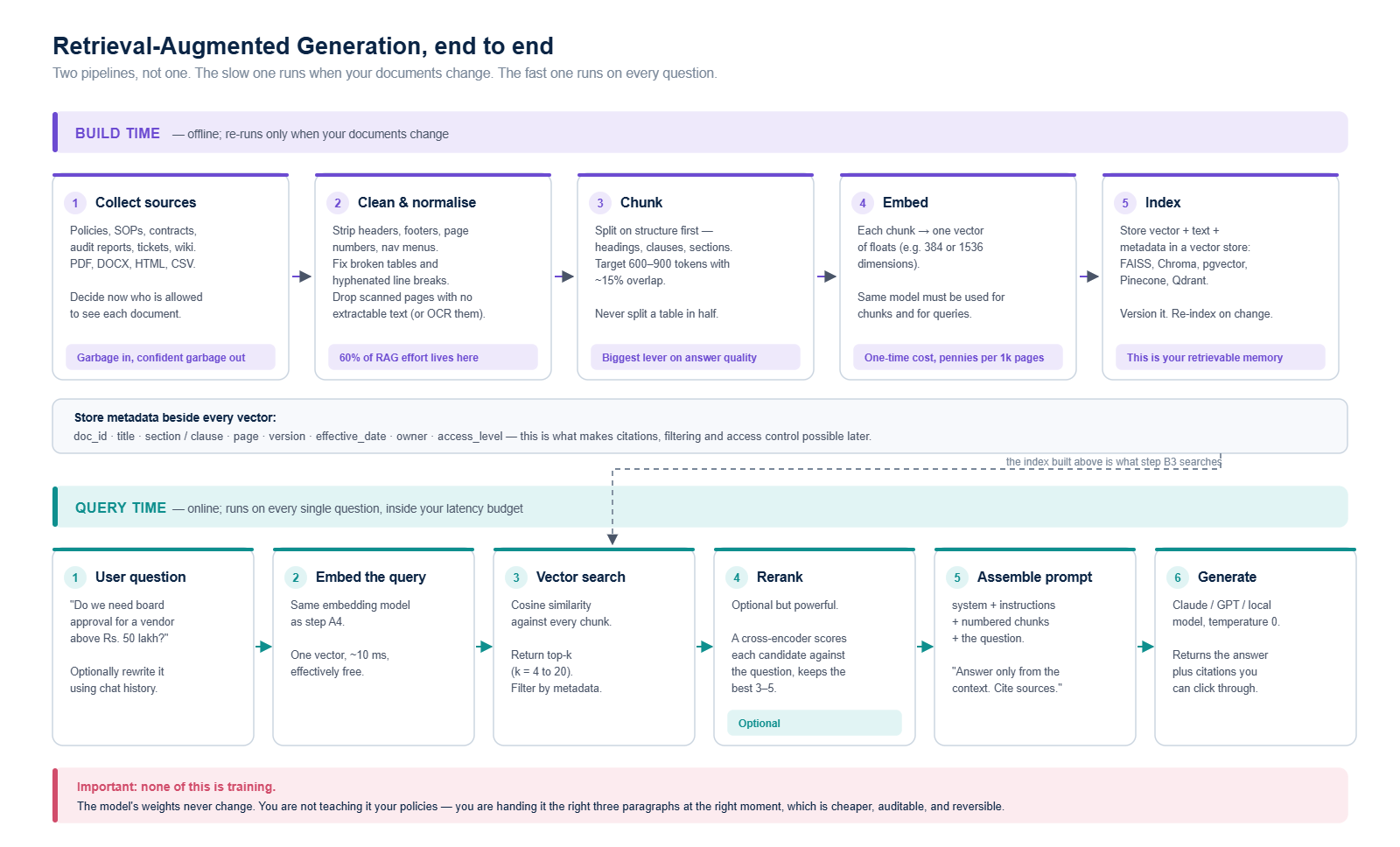
Worth saying plainly, because it is the most common misconception we meet: RAG does not train anything. The model’s weights never change. You are not teaching it your policies — you are handing it the right three paragraphs at the right moment. That is cheaper, auditable and reversible, which is precisely why it survives contact with a compliance function.
12. Preparing your data before you index it
This is where projects are won and lost, and it is the least glamorous part. The rule is blunt: garbage in, confident garbage out. A model given a badly-parsed table will not tell you the table was badly parsed. It will answer anyway.
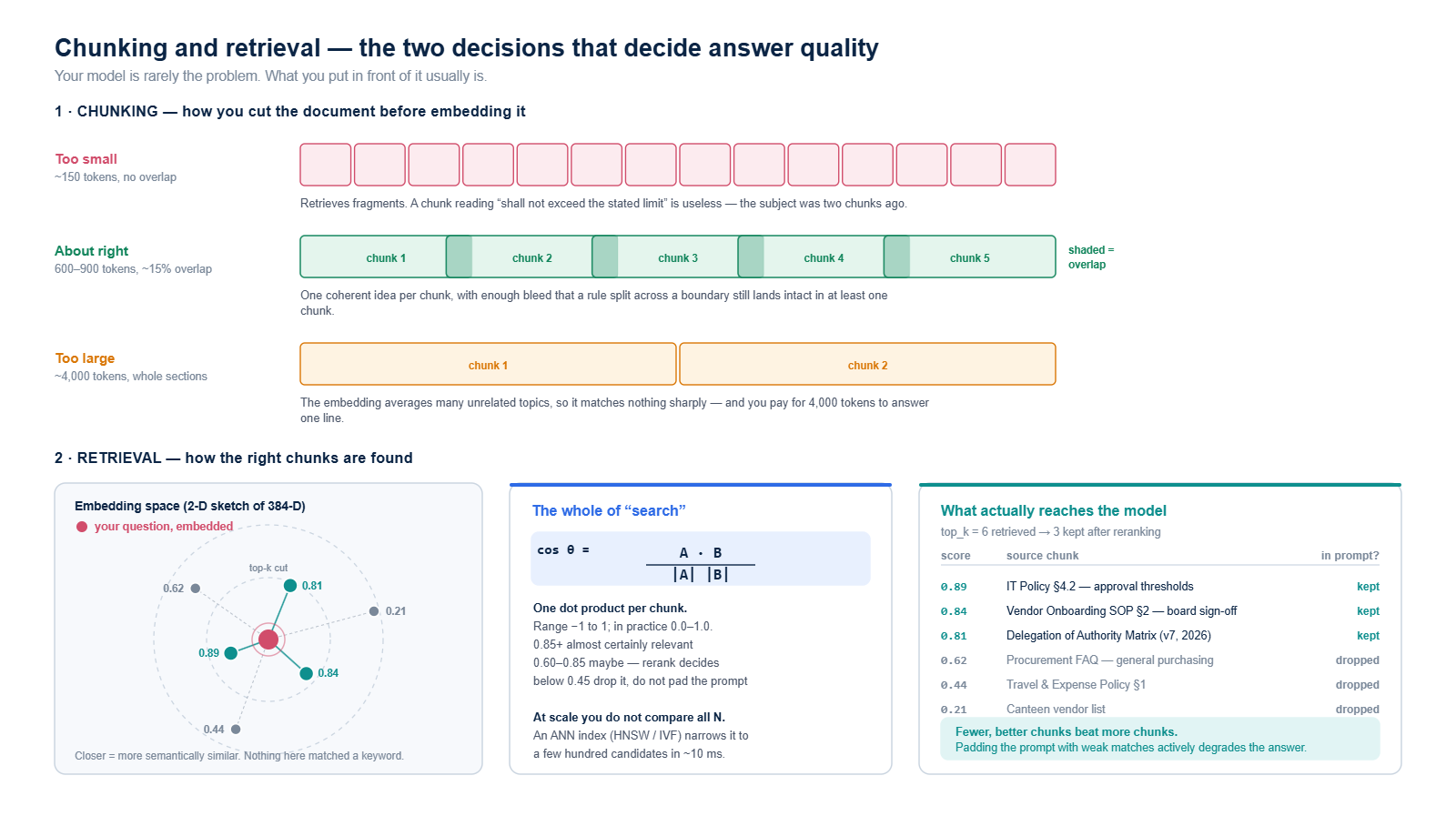
Extraction first. pypdf handles most digital PDFs; scanned pages need OCR or they will silently contribute nothing. Then cleaning: strip repeated headers and footers, page numbers and navigation furniture, rejoin words broken across line breaks, and collapse runaway blank lines.
Then chunking — the decision that matters most. Too small and you retrieve fragments: a chunk reading “shall not exceed the stated limit” is useless because the subject was two chunks ago. Too large and the embedding averages several unrelated topics, so it matches nothing sharply while burning context budget. Aim for 600–900 tokens with about 15% overlap, and split on structure — headings, clauses, sections — before you resort to counting words. Never split a table in half.
import re

def clean(text):
    text = re.sub(r"\r\n?", "\n", text)
    text = re.sub(r"-\n(?=[a-z])", "", text)                # rejoin hyphenated breaks
    text = re.sub(r"\n?Page \d+ of \d+\n?", "\n", text)     # drop footers
    text = re.sub(r"\n{3,}", "\n\n", text)
    return text.strip()

# A heading is a numbered clause, a markdown heading, or an ALL-CAPS line
HEADING = re.compile(r"^(?:\d+(?:\.\d+)*\s+\S|#{1,4}\s|[A-Z][A-Z \-/&]{6,}$)")

def split_sections(text):
    sections, current = [], []
    for line in text.split("\n"):
        if HEADING.match(line.strip()) and current:
            sections.append("\n".join(current))
            current = [line]
        else:
            current.append(line)
    if current:
        sections.append("\n".join(current))
    return sections

def chunk(text, target_words=550, overlap_words=80):
    """~550 words is roughly 730 tokens; 80 words of overlap is ~15%."""
    out, step = [], target_words - overlap_words
    for section in split_sections(clean(text)):
        words = section.split()
        if not words:
            continue
        if len(words) <= target_words:
            out.append(section.strip())
            continue
        for i in range(0, len(words), step):
            out.append(" ".join(words[i:i + target_words]))
            if i + target_words >= len(words):
                break
    return out
And attach metadata to every chunk as you create it. This is not optional bookkeeping — it is what makes citations, filtering and access control possible later, and it is almost impossible to backfill.
records = []
for doc in documents:                       # doc: dict from your loader
    for i, body in enumerate(chunk(doc["text"])):
        records.append({
            "text": body,
            "doc_id": doc["id"],
            "title": doc["title"],
            "section": doc.get("section", ""),
            "page": doc.get("page"),
            "version": doc["version"],
            "effective_date": doc["effective_date"],
            "access_level": doc["access_level"],   # enforce this at query time
            "chunk_index": i,
        })
13. Embedding and indexing
An embedding model turns text into a list of numbers — a vector — positioned so that passages meaning similar things sit close together. “Board approval is required above 50 lakh” and “purchases over Rs. 50L need director sign-off” land near each other despite sharing almost no words. That is the whole reason this beats keyword search.
import numpy as np, faiss
from sentence_transformers import SentenceTransformer

# Runs locally, free, 384 dimensions, strong quality for its size
embedder = SentenceTransformer("BAAI/bge-small-en-v1.5")

texts = [r["text"] for r in records]
vectors = embedder.encode(
    texts,
    normalize_embeddings=True,     # so inner product == cosine similarity
    batch_size=64,
    show_progress_bar=True,
).astype("float32")

index = faiss.IndexFlatIP(vectors.shape[1])   # IP = inner product
index.add(vectors)

faiss.write_index(index, "policies.faiss")
print(index.ntotal, "chunks indexed")
Two rules here, and breaking either produces retrieval that looks fine and is quietly broken. Use the same embedding model for chunks and for queries — vectors from different models are not comparable. And normalise your vectors, which lets you use a fast inner-product index and get cosine similarity for free.
FAISS is perfect for getting started and for indexes up to a few million chunks. When you need filtered search, multi-tenancy, incremental updates or a managed service, move to Chroma (easiest), pgvector (if Postgres is already your system of record — usually the pragmatic enterprise answer) or Qdrant / Pinecone at scale.
14. How retrieval actually works
Less magic than the name suggests. Embed the question with the same model, then compute cosine similarity against every chunk vector:
cosΘ = (A · B) / (|A| × |B|)
The result runs from −1 to 1, and in practice sits between 0 and 1. Above about 0.85 a chunk is almost certainly relevant; 0.60 to 0.85 is a maybe worth reranking; below roughly 0.45, drop it rather than padding the prompt. At scale you do not actually compare against every vector — an approximate nearest-neighbour index (HNSW or IVF) narrows the field to a few hundred candidates in about ten milliseconds.
def retrieve(question, k=6, min_score=0.45, access_level="internal"):
    qv = embedder.encode([question], normalize_embeddings=True).astype("float32")
    scores, ids = index.search(qv, k * 3)          # over-fetch, then filter

    hits = []
    for score, idx in zip(scores[0], ids[0]):
        if idx == -1 or score < min_score:
            continue
        record = records[idx]
        if record["access_level"] != access_level: # enforce permissions here
            continue
        hits.append({**record, "score": float(score)})
        if len(hits) == k:
            break
    return hits
Three upgrades, in the order they usually pay off:
- Reranking. A cross-encoder reads the question and each candidate together and scores the pair. It is slower than vector search but far more accurate, so the pattern is: retrieve 20 cheaply, rerank to the best 3. This is typically the largest single quality gain available.
- Hybrid search. Combine vector similarity with keyword search (BM25). Embeddings are weak on exact identifiers — clause numbers, part codes, error strings — and keyword search is excellent at them.
- Query rewriting. “What about for contractors?” is meaningless as a standalone search. Use the model to expand a follow-up into a self-contained question before you embed it.
15. Putting it together
SYSTEM = """You are a compliance analyst for an Indian enterprise.
Answer ONLY from the numbered context provided.
Cite the [n] of every chunk you rely on, inline.
If the context does not contain the answer, reply exactly:
"Not covered in the indexed documents."
Never invent a clause number, a date or a citation."""

TEMPLATE = """Context:
{context}

Question: {question}"""

def answer(question, access_level="internal"):
    hits = retrieve(question, k=4, access_level=access_level)
    if not hits:
        return "Not covered in the indexed documents.", []

    context = "\n\n".join(
        f"[{n}] ({h['title']} {h['section']}, v{h['version']})\n{h['text']}"
        for n, h in enumerate(hits, start=1)
    )

    text, tok_in, tok_out = ask(
        TEMPLATE.format(context=context, question=question),
        system=SYSTEM,
        provider="claude",
        temperature=0,
        max_tokens=700,
    )

    log_call(question, hits, text, tok_in, tok_out)   # your audit trail
    return text, hits

reply, sources = answer("Do we need board approval for a vendor above Rs. 50 lakh?")
print(reply)
for s in sources:
    print(f"  [{s['score']:.2f}] {s['title']} {s['section']} (v{s['version']})")
That is a complete, citable, permission-aware question-answering system in well under two hundred lines. It will not be perfect. It will be honest — and honest is the bar that matters when the output feeds a risk register or an audit file.
16. Making it production-worthy
Working code is roughly a third of the job. What separates a demo from something you can put in front of an auditor:
- An evaluation set before you optimise anything. Fifty real questions with known-correct answers and known-correct sources. Without it, “this prompt feels better” is the only feedback you have, and it is worthless.
- Retrieval measured separately from generation. When an answer is wrong, you need to know whether the right chunk was never retrieved or was retrieved and ignored. Those have completely different fixes.
- A full audit trail. Timestamp, user, question, retrieved chunk IDs and scores, model ID and version, the exact prompt, the response, token counts. This is your answer to “why did the system say that?” and it is also, not coincidentally, most of what an AI governance framework will ask you to produce.
- Guardrails on both sides. Redact PII before it leaves your network. Validate structured output against a schema. Verify that every citation the model produced actually appears in the retrieved chunks — this single check catches a surprising share of fabrications.
- Access control at query time, not display time. Filter by permission during retrieval. Never let a chunk into the prompt that the user is not entitled to see, because anything in the prompt can surface in the answer.
- Human review where the stakes justify it. Draft-and-approve, not decide-and-notify, for anything that touches a regulatory filing or a customer commitment.
- Pinned model versions and a re-run gate. Never let an alias upgrade your production model silently. Re-run the evaluation set before every deliberate change.
17. A pragmatic starting checklist
- Pick one narrow, painful, well-documented question your team answers repeatedly.
- Get a hosted API key. Spend an afternoon, not a quarter, proving the idea.
- Index a hundred pages, not ten thousand. Fix the chunking before you scale the corpus.
- Write your fifty-question evaluation set before you tune a single prompt.
- Log tokens from the very first call so your cost model is measured, not estimated.
- Start at temperature 0 and stay there until you can point to an output that is measurably too rigid.
- Add reranking before you add a bigger model. It is cheaper and usually helps more.
- Only then decide whether self-hosting, fine-tuning or a frontier model is worth the money.
Closing thought
The technical barrier to building with AI has essentially disappeared. Everything in this post — a governed, citable, permission-aware system over your own documents — is a few hundred lines of Python and a modest monthly bill.
What has not disappeared is the discipline. Knowing which questions are worth automating. Choosing retrieval over retraining when retrieval is the right answer. Measuring quality instead of trusting a demo. Keeping the audit trail that lets you defend an answer six months later. Those are governance problems wearing an engineering costume, and they are where the real work sits.
Start small, measure everything, and let the evidence tell you where to go next.
Timus Consulting Services helps organisations move from AI experiments to governed, auditable systems — across AI governance, GRC, operational risk, internal audit, IT risk and ERP. If you are weighing up where AI genuinely belongs in your risk and compliance stack, we would be glad to talk.