



By Timus Consulting Services | Odoo Partner in India
For most businesses, the challenge is not a lack of software. It is the number of different systems, manual tasks, follow-ups and disconnected processes involved in running the business every day.
Sales teams spend time updating leads. Finance teams chase invoices and reconcile transactions. HR teams manage employee information and payroll. Operations teams monitor stock, purchasing and production. And management often has to wait for reports before making important decisions.
This is where a well-connected ERP system can make a real difference.
With the release of Odoo 20 in September 2026, Odoo takes another significant step towards making business operations more intelligent, connected and automated. The latest version introduces a stronger focus on AI-powered workflows, improved user experience, smarter accounting, enhanced manufacturing capabilities and a more flexible digital experience.
But what do these changes actually mean for businesses? More importantly, how can organisations put them to practical use? Let’s look at the features that deserve attention.
1. AI moves from answering questions to taking action
One of the most interesting developments in Odoo 20 is the expanded role of artificial intelligence. Until recently, many businesses viewed AI as a tool for generating content, answering questions or assisting employees with information. Odoo 20 takes this further by introducing AI agents that can participate in business workflows and perform actions within the system.
Imagine a sales enquiry arriving by email. Instead of someone manually reviewing it, identifying the prospect and updating the CRM, an AI-driven workflow can help process the information and assign the lead to the appropriate salesperson.
Other possibilities include:
- Creating a project when a contract is signed.
- Updating records based on information in uploaded documents.
- Triggering actions when inventory reaches a defined threshold.
- Reviewing business information and responding to questions using relevant records.
- Connecting Odoo with external AI assistants through the Model Context Protocol (MCP).
The important distinction is that AI is becoming part of the operational workflow, rather than remaining a separate tool employees have to open and use independently. For businesses, this creates opportunities to reduce repetitive work and give teams more time to focus on decisions, customers and execution.
2. A more intelligent CRM that helps sales teams find opportunities
A CRM should do more than store contact details and record sales conversations. It should help businesses identify opportunities and move them forward. Odoo 20 brings improvements to lead generation and pipeline management, including ways to identify potential prospects based on industry and location and capture contacts from different sources.
- Finding potential business leads through industry and location-based searches.
- Capturing website visitors as potential prospects.
- Importing contacts from Outlook and Gmail.
- Creating opportunities by scanning business cards.
- Automatically directing new leads into the appropriate sales pipeline.
For organisations managing multiple sales teams, territories or business units, these improvements can help create a more organised lead management process. The real benefit is not simply having more leads. It is helping sales teams spend their time on the right opportunities.
3. Accounting becomes more proactive with AI assistance
Finance teams are often under pressure to close books faster, maintain accurate records and provide management with timely financial information. Odoo 20 introduces an AI accounting assistant that can help users understand financial information through questions and answers based on accounting reports.
Finance teams can ask questions about outstanding receivables or cash flow and receive information drawn from relevant reports. The assistant can also review reconciliation issues and provide summaries with recommendations.
- Paying vendor bills directly through Odoo.
- Handling payments individually or in bulk.
- Reviewing reconciliation issues with AI assistance.
- Improved visibility into financial information.
This is a meaningful development for businesses that want their finance function to become less dependent on manual reporting and more focused on financial visibility. AI assistance does not replace financial controls or professional judgement; it gives finance teams another way to access and review information.
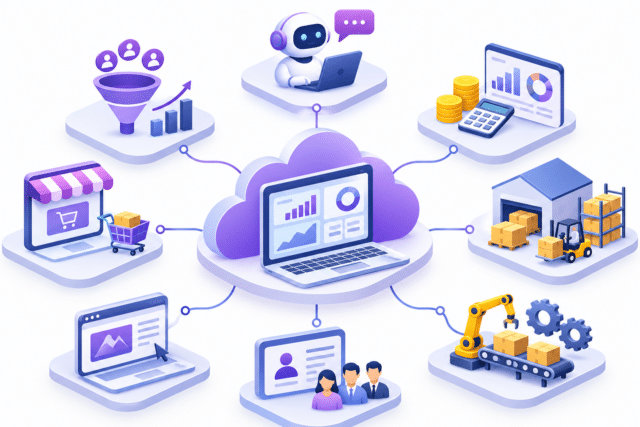
An ERP platform connects sales, finance, people, inventory, manufacturing and digital commerce.
4. Inventory and purchasing get smarter
Inventory management is one of those areas where small inefficiencies can quickly become expensive. Too much stock ties up working capital. Too little stock can delay deliveries and affect customer relationships. Purchasing teams also need reliable information before deciding when and how much to order.
- Suggested minimum and maximum stock levels based on recent sales activity.
- Draft purchase orders based on replenishment requirements.
- Improved vendor quality visibility.
- Automatic matching of vendor bills with purchase orders, with discrepancies highlighted.
- Better handling of incoming shipments and product repacking.
For distributors, manufacturers and businesses managing multiple warehouses, these changes can help improve stock visibility and purchasing discipline. The objective is straightforward: make inventory decisions based on actual business activity rather than relying entirely on manual monitoring.
5. Manufacturing workflows designed to keep production moving
Manufacturing delays rarely happen because of one major issue. More often, they result from small interruptions across production planning, work orders, material availability and shop-floor coordination. Odoo 20 introduces improvements to manufacturing operations, including continuous production capabilities.
Operators can register completed quantities directly from work orders, allowing the next operation to be released without unnecessary waiting.
- Comparing Bills of Materials more easily.
- Improved manufacturing order scheduling through Gantt views.
- Better prioritisation using Kanban views.
- More flexible production planning and rescheduling.
For manufacturers managing multiple production lines or complex workflows, these improvements can support better coordination between planning and execution.
6. Build websites faster with AI-powered website creation
A business website is often the first place a prospective customer interacts with a company. Odoo 20 makes website creation more accessible with AI-assisted page generation. Instead of starting with a blank page, users can describe the type of page they want, and Odoo can generate a starting point.
AI can also help create website snippets, improve content, translate text and support SEO optimisation. The website editor has been redesigned to make content editing more organised. This can be useful for businesses that frequently create landing pages, product pages, promotional campaigns or event pages, and can allow marketing teams to work more independently.
7. eCommerce improvements focused on the customer journey
For online businesses, the buying experience matters just as much as the product itself. Odoo 20 introduces several improvements designed to make online shopping more convenient.
- Delivery date selection during checkout.
- Better product variant presentation.
- Improved visibility of progress towards free shipping.
- More flexible pickup-point selection.
- Return requests through the customer portal.
- A Pay on Invoice option for eligible transactions.
These may appear to be small improvements individually, but together they help remove friction from the buying journey. For retailers and distributors, a smoother checkout experience can make a meaningful difference to customer satisfaction and order completion.
8. HR and Payroll become more flexible
HR teams need systems that can handle employee information, salary calculations, attendance and documentation without creating unnecessary administrative work. Odoo 20 introduces useful improvements across employee management and payroll-related processes.
- Salary simulation directly from an employee profile.
- A redesigned payroll dashboard with setup warnings.
- The ability to test a payroll run and print payslips before validation.
- More flexible working schedule definitions.
- Salary estimation based on a target net salary.
- Direct integration of employee expenses into payroll.
- Improved employee document signing workflows.
For businesses managing growing teams, these improvements can help HR and payroll teams work with greater clarity and reduce repetitive administrative tasks. The exact payroll functionality available will depend on the relevant country localisation and configuration.
9. Work does not have to stop when the internet connection does
Business operations do not always happen in an office with a reliable internet connection. Field service engineers, warehouse teams and employees working at customer locations may regularly encounter connectivity issues.
Odoo 20 introduces offline capabilities that allow users to create, edit, archive, unarchive and delete records, as well as access previously executed searches. Changes can synchronise when connectivity is restored. This is particularly relevant for organisations with mobile teams and field-based operations.
What should businesses consider before upgrading to Odoo 20?
New features are exciting, but upgrading an ERP system should never be treated as simply installing the latest version. Businesses should first understand how their current system is configured, which modules have been customised, what integrations are in place and how their teams use the platform.
- Review existing customisations: identify which custom modules and integrations need compatibility checks.
- Evaluate AI use cases: decide where AI can genuinely reduce manual work and where human approval should remain part of the process.
- Review data quality: automation works best when business records are accurate and consistent.
- Check localisation requirements: accounting, tax, payroll and statutory requirements differ across countries.
- Plan user adoption: new functionality creates value only when employees understand how to use it.
- Test before going live: validate workflows, reports, integrations and business-critical processes in a test environment.
A structured upgrade plan helps businesses take advantage of new capabilities without disrupting ongoing operations.
The bigger picture: ERP is becoming more intelligent
What stands out about Odoo 20 is not one individual feature. It is the direction in which the platform is moving. AI is becoming more closely connected to everyday workflows. Accounting is becoming more interactive. Manufacturing and inventory are gaining better operational tools. HR and payroll are becoming more flexible. Website and eCommerce teams are getting more ways to create and manage digital experiences.
For businesses, this means an ERP system can increasingly become the place where information, people and processes come together. However, technology alone does not guarantee better business outcomes. The real value comes from understanding how an organisation operates and configuring the system around its actual requirements.
How Timus Consulting Services can help
At Timus Consulting Services, an Odoo Partner in India, we work with businesses to implement, configure and optimise Odoo ERP around their operational requirements.
Our approach is not to introduce technology for the sake of adding features. We focus on understanding existing business processes, identifying operational challenges and building an ERP environment that supports the way the organisation works.
Whether you are considering a new Odoo implementation, reviewing your current ERP environment or planning an upgrade to Odoo 20, our team can help you assess the possibilities and define a practical roadmap.
FAQs
1. What is Odoo 20?
Odoo 20 is the latest major version of Odoo ERP, designed to help businesses manage operations through integrated business applications.
2. What are the key features of Odoo 20?
Odoo 20 introduces improvements across CRM, accounting, inventory, manufacturing, AI automation, reporting, and business workflows.
3. How does Odoo 20 improve business efficiency?
It reduces manual tasks, connects business departments, automates workflows, and provides better operational visibility.
4. Can businesses upgrade from older Odoo versions to Odoo 20?
Yes. Businesses can upgrade supported older Odoo versions to Odoo 20, subject to compatibility and migration requirements.
5. Why choose Timus Consulting for Odoo ERP implementation?
Timus Consulting provides Odoo ERP implementation, customization, integration, data migration, training, and ongoing support to help businesses streamline their operations.